PloViewAuto11.0
Publisher Description
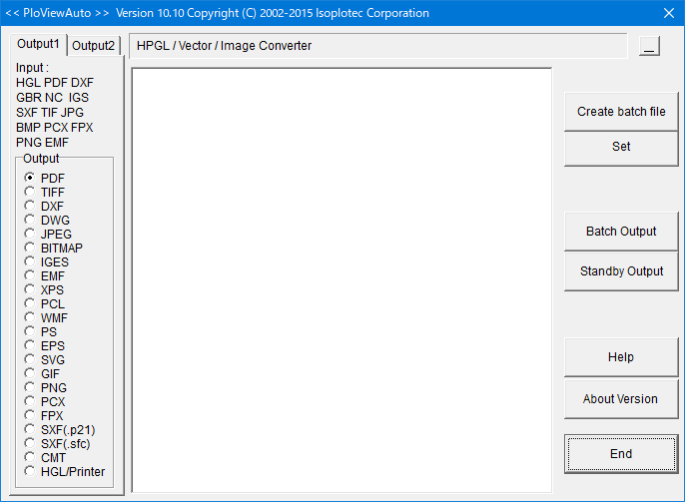
PloViewAuto reads a lot of HPGL/Vector/Image files continuously, and converts it into format files often used, such as PDF, TIFF, DXF, and IGES, at high speed automatically.
1. File format which PloViewAuto handles is as follows.
(1) Output 1
* Input
HPGL,HP-GL/2,HP RTL,PDF,DXF,DWG,GERBER,NC-Drill,IGES,SXF,EMF,TIFF,JPEG,Bitmap,PCX,FPX,GIF,PNG
* Output
PDF,HP-GL/2,EMF,TIFF,DXF,DWG,JPEG,Bitmap,IGES,SXF, PCX,FPX,GIF,PNG,,CMT,HPGL/Printer
(2) Output 2
* Input
PDF
* Output
WMF, EMF, PS, EPS, SVG, XPS, HPGL, PCL
2. Output mode has the two following modes.
(1) Standby output mode
The same input file as specified input file name with wild card is looked for, if it is, it will output, and input file is automatically deleted after output.
When there is no input file , it waits until file comes.
(2) Batch Output mode
Plural input files described in specified output list file are outputted continuously.
3. This program is the automatic output special edition version PloView and set.
This program generates command line which starts the automatic output special edition version PloView, and has function to start PloView.
Example of PDF output command line of PloView :
PloView.exe /p abc.hgl abc.pdf
About PloViewAuto
This Viewers program is available in English. It was last updated on 29 September, 2026. PloViewAuto is compatible with the following operating systems: Windows.
The company that develops PloViewAuto is Isoplotec Corporation. The latest version released by its developer is 11.0.
The download we have available for PloViewAuto has a file size of 32.5 MB. Just click the green Download button above to start the downloading process. The program is listed on our website since 2022-07-27 and was downloaded 85 times. We have already checked if the download link is safe, however for your own protection we recommend that you scan the downloaded software with your antivirus. Your antivirus may detect the PloViewAuto as malware if the download link is broken.
How to install PloViewAuto on your Windows device:
- Click on the Download button on our website. This will start the download from the website of the developer.
- Once the PloViewAuto is downloaded click on it to start the setup process (assuming you are on a desktop computer).
- When the installation is finished you should be able to see and run the program.
Program Details
System requirements
Download information
Pricing
Version History
version 11.0
posted on 2022-07-27
(1) Compatible with Windows 11.
(2) Code signing was added.
version 10.1
posted on 2015-03-02
It corresponds to PloView Ver. 10.1.
